
Give your Copr profile a README
If you use Copr a lot, your project list grows fast. Personal experiments, scratch builds, one-off test repos, they all pile up next to the number of projects you actually care about. Pinned projects already assist with that; you can keep up to four projects visible in your profile by pinning them. But four is a hard limit, and a handful of icons at the top of the page is the only way it can highlight it.
Now you can go further. Copr profiles support a custom Markdown description, similar to a GitHub profile README, and there is no limitation on what you put there.
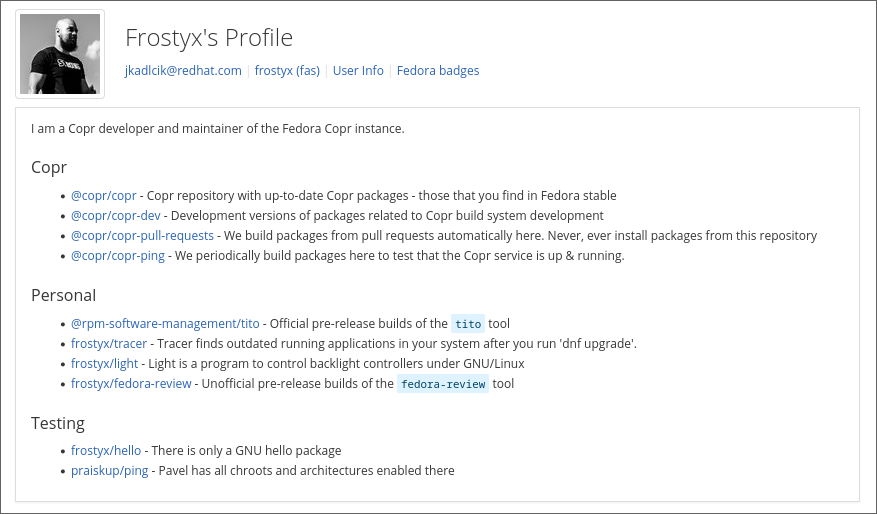
It can be used in many ways, like:
- A curated project list, like the example above: a hand-picked list of your projects, each with a one-line note on what it’s for, project groups you maintain, and packages you want new contributors to find first.
- A bio, so people landing on your profile know who you are before they scroll through your projects. Contact info, links to your FAS account, or whatever you’d want a stranger to see first.
These aren’t the only options; you can further customize your profile based on your requirements.
How to set it up
If you are logged in, go to your profile page and click Customize Profile. Groups have the same button, visible to any member of the group.
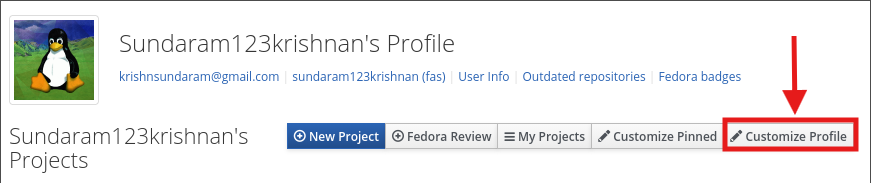
https://copr.fedorainfracloud.org/user/customize-profile/
For a group, the URL takes the group name:
https://copr.fedorainfracloud.org/user/customize-profile/<group_name>
Happy customizing!